The Simply Piano app has shot to the top of the online piano lessons market — and it’s easy to see why. It’s designed for beginners and those returning to piano, with an interactive approach that aims to make progress feel fun, fast, and practical.
But if you’re here, you must be wondering: what exactly is Simply Piano? How does Simply Piano work? And, above all, is it worth it?
To help you answer these questions (and more), I’ve written this Simply Piano review after completing several lessons on the platform. Plus, I’ve taken online piano lessons from other providers, so I can compare Simply Piano with what else is on offer.
With its unique, interactive approach, Simply Piano aims to keep you moving forward and discovering something new every single time you sit at the keyboard to play the songs you love.
But does Simply Piano live up to this promise? Is it the right platform for you? Read on to find out.
For many people, learning piano isn’t about exams or performance — it’s about finally expressing something that’s been sitting inside them for years. If that sounds like you, Simply Piano offers a low-pressure way to start without feeling overwhelmed.
What’s New (March 2026)
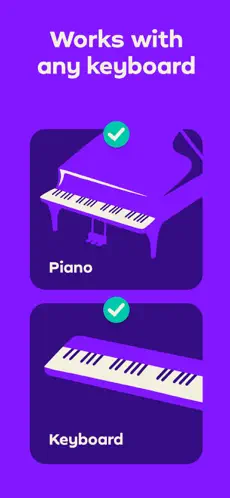
- Works with any piano or keyboard, and runs on iOS/Android (phones and tablets).
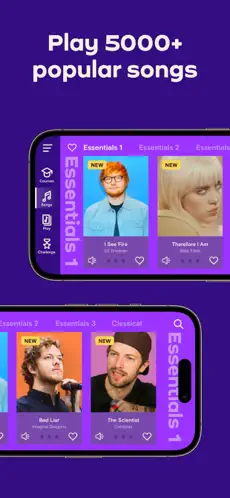
- Strong focus on learning through songs, with a library of 5,000+ songs across genres (including Disney favourites, pop hits, and classics).
- Songs are adapted by level, so you can start with simpler arrangements and unlock more advanced versions later.
- Real-time feedback: the app listens via your device's microphone and catches mistakes as you play.
- Credibility: lessons created by musicians and piano teachers, with Trinity College London accreditation.
- Social proof + support: 290k+ Facebook community, plus online FAQs and a 24/7 support team.
- Partnerships include Disney, Amazon, Universal, Yamaha, Casio, and Musicnotes.
.
Quick Summary
Features
- Wide range of 33+ courses introducing core piano concepts
- 5,000+ songs across styles (including Disney favourites, pop hits, and classics)
- Real-time feedback as you play (the app listens through your device's microphone)
- Works with any piano or keyboard; iOS & Android (phones + tablets)
- Choice between Chords and Soloist pathways
- Downloadable sheet music and short practice workouts
- 290k+ learner community on Facebook, plus online FAQs and a 24/7 support team
- Accredited by Trinity College London
Pros
- Game-like teaching structure helps you internalise notes (and stay motivated)
- Real-time feedback makes it clear what needs practice before you move on
- Very beginner-friendly pacing and explanations
- Huge song catalogue (and you start playing recognisable songs early)
- Flexible: you can pick and choose courses depending on what you want to learn
Cons
- Not a comprehensive music education (some learners will want extra theory/rhythm support elsewhere)
- Rhythm recognition can be forgiving at times (I was able to progress even when I played off-beat in one test)
Best for: Absolute beginners — particularly those who have never tried the piano and want an easy way in. Also, those who’ve been put off learning the piano due to an overemphasis on scales and theory. Simply Piano has a strong focus on songs and practice.
Overall: The way to start out on piano. Simply Piano is a great app for beginners to master the basics. It’ll have you playing quickly and gradually building a list of recognisable songs. As you do, you’ll gain a clearer understanding of notes and chords, and how they fit into a more general musical context. However, the lack of direct teaching means there might be a few gaps to fill if you want to take your piano playing further. That said, out of everything out there, Simply Piano is a fantastic way to get started.
In this detailed Simply Piano review, I’ll be covering:
- What Simply Piano is and how it works
- What a lesson is like
- A review of 3 classes
- What I liked and what I thought could be improved
- Who Simply Piano is for
- Costs, refunds, and free trials
- Tips for finding the right course
- Alternatives to Simply Piano
- What others have said
- Is Simply Piano worth it?
So, let’s go!
What is Simply Piano?
Video by Pablo Di Cagno from Pixabay
Simply Piano is a piano-learning app within the Simply suite (via hellosimply.com), designed for beginners and people returning to piano. The promise is simple: learn by playing, with the app listening and guiding you step-by-step from day one.
It’s also been recognised through major app-store features and media mentions. Simply Piano has been listed as one of Apple’s Editor’s Choice apps, has been mentioned by major publications including Forbes, The New York Times, and The Guardian, and has also been recognised through Google Play awards and features (you can see one of those collections here: Google Play’s).
What makes Simply Piano feel different from some competitors is that it’s built specifically for mobile and tablet devices and designed to remove friction. You don’t need a complex setup — you put your phone or tablet near the keys, and the app listens as you play.
How does Simply Piano work?
Simply Piano works like most apps: you download it to your device to get started.
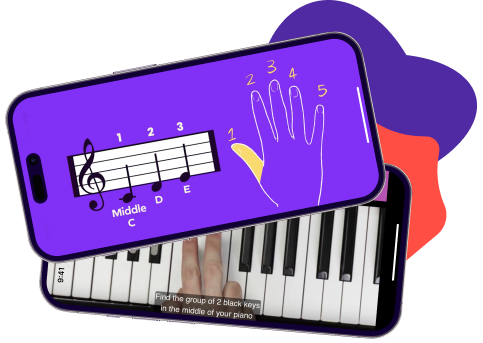
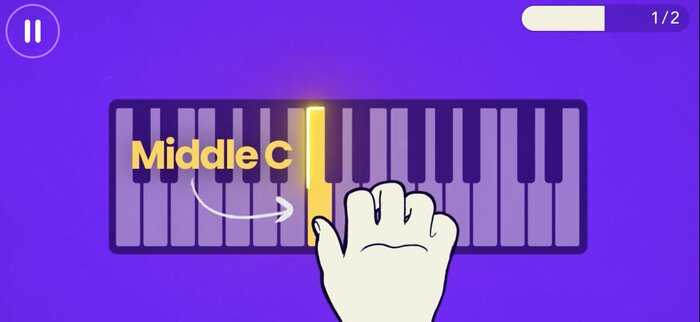
From there, the method is very practical: you’re shown notes (and later chords) on-screen, you play them on your piano or keyboard, and the app reacts to what you do.
The app listens through your device’s microphone as you play and gives real-time feedback, so you can immediately see what needs more practice.
What you need
To use Simply Piano, you will need:
- A piano or keyboard (acoustic or digital — Simply Piano works with any piano or keyboard)
- A phone or tablet on iOS or Android
Most people simply place their phone/tablet where it can “hear” and register the notes clearly.
Accessing the app
The next step after downloading the app is to create an account with your email. This will be your main profile, although you can add others later depending on the subscription option you choose.
It’s also worth noting that kids and adults can follow different personalised learning paths, which helps keep the content age-appropriate.
Once you’ve purchased a subscription or you’ve signed up for a free trial, then you’re free to really get started.
Courses and progression
Simply Piano offers 33+ courses, along with various shorter exercises and lessons to help you on your way.
The courses are structured to get progressively harder as you build on what you’ve learnt. The first course, Piano Basics, teaches the fundamentals. Once you’ve completed the initial courses, you’re free to progress to the rest of the classes depending on your goals.
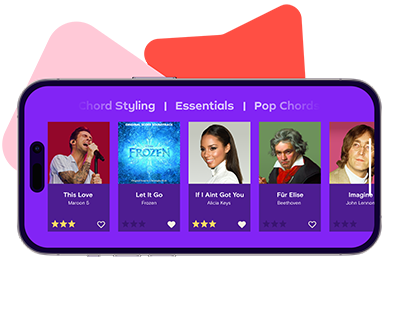
One of Simply Piano’s biggest strengths is its song library: 5,000+ songs across genres (including pop, classical, movie/TV soundtracks, kids’ songs, holiday music, and more). Songs are adapted to different skill levels, so you can start with simplified versions and unlock more advanced arrangements as you progress — and the library is updated regularly.
Other features on the app include short practice workouts, sheet music options, and the chance to join a large Facebook community (290k+ learners).
Simply Piano classes
Simply Piano has 33+ courses.
Most of these are divided into two categories:
- Chords
- Soloist
However, you can pick and choose between these categories to make your own curriculum.
The Soloist Pathway focuses on sheet music, sight reading, and technique. So, you’ll learn how to play the melody in the right hand and the accompaniment in the left. As you get more advanced, you’ll learn some popular piano music.
Chord lessons are focused more on accompaniment. You’ll learn key chords and the pop songs that use them, before going into more specific genres like jazz and blues.
You don’t need to stick to either pathway and can choose courses from anywhere. You can also start at any point, so if you’re more advanced, feel free to dive in with later courses — but it’s worth remembering that the platform is primarily built to serve beginners.
Some courses don’t fit neatly into either category. These include early foundational courses (such as Piano Basics), reading-focused courses, and music theory-style lessons.
What a lesson is like
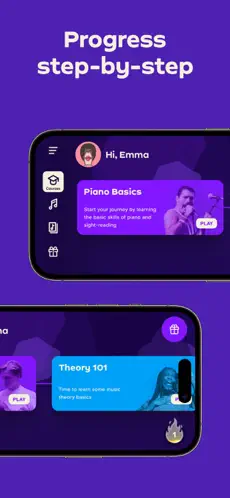
A lesson typically starts with the introduction of a concept in video form, explaining what the lesson is about.
Then there’s a practice session, where Simply Piano will provide you with notes (and later chords) and ask you to play them on your keyboard.
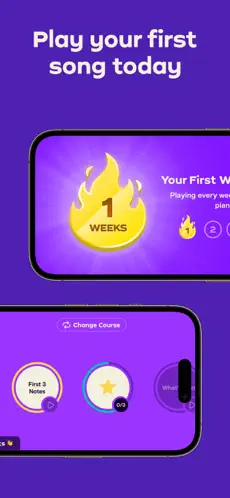
If you get a note right, the note will appear blue. If you get a whole passage right, a tick will appear in the top right corner, and you’ll be able to move on.
Getting it wrong means the note will turn red. If you keep getting it wrong, Simply Piano will slow down the tempo and have you play it right a few more times until you progress.
Because the app is listening through your device’s microphone, it can catch mistakes as you play and nudge you to repeat tricky passages until you’ve got them.
Typically, a lesson will end with you playing what you just practised, but with a backing track, usually from a popular song. The same process applies: you’ll be asked to play what’s on the screen, and you’ll progress if you get it right.
Most lessons are structured like this. However, lessons will gradually become more complex as new ideas are added to what you’ve learnt.
My review of 3 classes
To review Simply Piano, I spent some time taking and testing various courses on the app.
Below is my review of three Simply Piano classes.
I’ve chosen them because they are aimed at beginner, intermediate, and advanced players. One is the first course on the course page, one comes somewhere along the middle, and one is right at the end. This should give you a good sense of the spectrum of courses on offer.
Piano Basics
You will learn:
- A basic overview of the piano
- Your first three notes (C, D, E)
- F and G notes
- Right-hand practice
- Where to go next
- How to play a song of your choice
Pros:
- Game-like teaching structure helps to internalise notes
- Slow, easy-to-understand pace
- Lots of practice examples
- Opportunity to learn a song very early in the process
- Short videos introduce you to the practical sections
- Focuses mainly on getting you familiar with notes, with a few tips on posture and finger positioning
Cons:
- Not many broader musical ideas were explained at this stage
- Requires access to a piano/keyboard (which may sound obvious, but it matters for truly “mobile” learners)
Length of course: Will depend entirely on how long it takes you to complete the practice section.
Best for: Absolute beginners — specifically those who prefer to learn by practically doing things rather than having things explained to them.
Overall: This is an extremely basic introduction to the piano, so if you’ve been keen to get to grips with the instrument but have never known where to start, this is for you. It’s especially useful for those who want to learn songs quickly and enjoy learning by practising.
Pop Chords I
You will learn:
- What chords are
- C and G chords
- D major chord
- Adding the left hand
- E minor chord
- 4 chords and the bass
- Reading chords and lyrics
- 4 chords melody
- Songs like Say Something, Knocking on Heaven’s Door, and more
Pros:
- Really focuses in on fundamental pop chords
- Progressively gets harder and builds on your knowledge
- Teaches you about popular music in a practical way
- Let's you add recognisable songs to your repertoire
- Continual practice will develop your musical intuition
- Genre-specific (which is often why people learn piano in the first place)
Cons:
- Can feel a little disjointed: you go from lesson to lesson without much “big picture” explanation
- The note-recognition function doesn’t correct everything (tempo/dynamics/expression still largely come from you)
Length of course: Will depend entirely on how long it takes you to complete the practice section.
Best for: Anyone who has completed Piano Basics and early essentials. Specifically, those who are interested in playing (and maybe even singing) popular music.
Overall: This course is great for anyone with a basic understanding of piano notes to get to grips with chords. It’s useful for people whose learning goal is to play popular songs. At this level, the limitations of not teaching broader musical ideas become more noticeable, but students will still get a strong foundation in fundamental pop chords — which is what many people come to Simply Piano for.
Jazz Chords I
You will learn:
- A recap of the chords
- D minor 7 chords
- 2-5-1 progression
- Jazz rhythmic pattern
- C major 7 chord
- A minor 7 chord
- Turnaround progression
- A variety of jazz standards
Pros:
- Teaches the fundamentals of jazz in a very approachable way
- Combines harmonic and rhythmic lessons
- Covers both specific chords and useful progressions
- Lets you add famous tunes from the jazz songbook to your repertoire
- Progressively builds on what you’ve learnt so far
- Focuses on a specific but widely popular genre
Cons:
- The technology isn’t as strong on recognising rhythm precisely (which matters a lot in jazz)
- At this level, some learners may want more comprehensive guidance than an app can give
Length of course: Will depend entirely on how long it takes you to complete the practice section.
Best for: Students who have been following the Chords pathway, or learners with a basic-to-intermediate level of piano and an interest in jazz.
Overall: One of the more advanced courses in the Chords pathway. At this point, it was pretty clear to me that the app is strongest for beginners. Although this will give you a grounding in jazz concepts, you might find you eventually outgrow Simply Piano and want something more comprehensive (or teacher-led) if jazz becomes a serious focus.
What I liked about Simply Piano
Great for beginners
For me, the biggest pro of Simply Piano is how accessible it is for beginners — which is exactly what the app was set up for.
There are a few reasons for this, including the practical teaching method, the focus on genres, and the additional features.
But what I think is great about this app, in particular, for beginners, is the content itself. Piano Basics gives you a clear understanding of notes right from the start. And by offering the option to learn either the Chords or Soloist pathways, beginners can build a learning path based on what they actually want to play.
The app's overall design is also very appealing. This matters because learning a new instrument can be daunting, so creating a positive learning environment is important.
I’ve tried a lot of beginner piano platforms before, and I’d say Simply Piano does a lot right for an absolute introduction.
Practical lessons
Another key pro of Simply Piano is its lesson style. The app listens through your device's microphone as you play and gives real-time feedback, so you always know what needs more practice before you move on.
Lessons typically consist of a short introductory video followed by practice sessions where you’re presented with sheet music and required to play what’s written. The app recognises what you’ve played and lets you continue with the class once you’ve played it correctly.
Gradually, the lessons get harder, and they’ll typically end with you playing a full song based on whatever you’ve been learning.
This can be a genuinely helpful way for beginners to learn. Practising is essential to learning any skill. By repeating notes and chords over and over again, you gradually learn how to play them correctly and how the sheet music corresponds to the keys.
However, the lessons aren’t tedious. You’ll often play along to backing tracks as well.
Provides a wider musical context
Another pro of Simply Piano is that it embeds learning inside a musical context rather than making it all feel like drills.
Simply Piano’s classes focus on genres like rock, pop, and jazz. This means you develop fundamental skills with a clear “why” behind them.
You’ll also have the opportunity to learn a massive variety of songs — which is important, because a lot of people’s interest in piano is sparked by the desire to play music they already love.
And it’s not just “a lot of songs” in a vague sense. Simply Piano’s library includes 5,000+ songs across genres, and the app adapts songs by level — so you can start with simpler arrangements and unlock more advanced versions later. The catalogue is also updated regularly, which matters if you’re learning partly for motivation and fun.
Right from the start, you’ll be asked to choose from a selection of songs. This is the song that you will play at the end of Piano Basics (I chose Do You Want To Build A Snowman).
Additional features
Finally, there are a few additional features worth mentioning.
Firstly, there are the short practice workouts. Personal practice is essential to develop on the piano, so having a built-in feature that nudges you to practise alongside the main course is a big plus.
There’s also the chance to download sheet music for songs you’ve learnt, which can be useful if you ever want to perform for friends and family and show what you’ve been learning.
And last, but not least, you have the chance to join a large Facebook community (290k+ learners) where you can discuss what you’ve been learning, challenges you’ve been facing, and tips for other learners.
If you get stuck, Simply also points learners to online FAQs and a 24/7 support team.
What could be improved
Not comprehensive
My biggest problem with Simply Piano is that it isn’t comprehensive enough — some important aspects of piano playing are glossed over or missed.
They do include some focus on musical aspects beyond the notes and chords. For example, at the end of Piano Basics, there is a quick video on posture.
However, some teachers would spend far longer on this concept because it’s crucial to your playing and your sound.
By focusing mainly on getting students to play the right notes, Simply Piano misses other elements that go into becoming a well-rounded musician, such as rhythm, dynamics, tone, expression, and phrasing.
I tested this out when I was practising 500 Miles in Pop Chords I. I played the right notes but deliberately played off-beat. The app still marked my playing as correct, and I was allowed to move on.
This matters because if you’re new to music entirely, you might not yet have a strong sense of rhythm. So you could move on to more complex ideas without having a solid grounding in a key musical concept.
Ultimately, it’s a matter of what you’re looking for. If you want to learn a few songs and get a basic grounding in notes and chords, Simply Piano is a solid introduction. If you want a deeper musical education, you’ll probably want to pair it with another resource or a teacher.
Can feel a little disjointed
Because of how the classes are taught, I personally felt there wasn’t enough “flow” in the lessons.
Although I liked how you would practise what you learned through a song, and how the lessons gradually challenged you as more complex ideas were introduced, I felt this could’ve been done with reference to a wider concept.
For example, Jazz Chords I introduces one of the most diverse genres in the history of music, yet most of it was covered in a short video before you got into playing.
Aside from these quick videos, there’s no one there to guide you through the music. Just playing the notes can become a bit tedious, especially as you become more advanced.
This left the learning experience with Simply Piano a bit disjointed. It’s my own opinion, but something worth considering if you enjoy the flow and interaction of in-person lessons.
Who Simply Piano is for
- Absolute beginners interested in learning piano
- Anyone who likes to learn practically — by doing things rather than having them explained
- Anybody with a piano in the house that they’ve either never used or been put off by overly theoretical teaching
- People who like a visual and aesthetically pleasing learning environment
- Anyone who wants to learn on the go through their tablet or phone
- Piano newbies interested in specific genres like rock, pop, and jazz
- Anybody who wants to learn a favourite song on the piano
- People returning to the piano who want a structured way to restart from the beginning
- Learners who want something to practise with between lessons with a teacher
- Adults who’ve always wanted to learn piano but never felt “musical enough” (and want an encouraging way to start)
Not best for: If you’re already an intermediate/advanced player, or you want deeper theory-first explanations and coaching on musicality (rhythm, dynamics, expression), you may find you outgrow the app and prefer a more comprehensive course or a teacher-led approach.
How much does Simply Piano cost?
Simply Piano pricing is based on a subscription model, and the exact cost can vary depending on your region, the platform you use to subscribe (Apple/Google/direct), and the plan you choose.
Rather than quoting a fixed price that may not apply to your country, I recommend using the “Check Latest Prices” button on this page to see the current options where you live.
Pricing & Plans (Updated 2026)
Simply Piano currently lists three main plan names — Individual, Duo, and Family. The difference mainly lies in how many people can learn under one subscription (and whether you want access to additional Simply apps).
Plan comparison (guide only — confirm at checkout):
| Feature | Individual | Duo | Family |
|---|---|---|---|
| Number of learner profiles | 1 | 2 | Up to 5 |
| Simply Piano access | ✓ | ✓ | ✓ |
| Simply Guitar, Sing & Draw access | — | — | ✓ |
| iOS availability | ✓ | ✓ | ✓ |
| Android availability | ✓ | Limited | ✓ |
| Best for | Solo learners | Two people learning together | Families / mixed-skill households |
| Billing options | Monthly or Annual | Monthly or Annual | Monthly or Annual |
Note: pricing and plan availability can vary by country and platform, so always confirm the current details at checkout.
Simply Piano free trial
Simply Piano often offers a 14-day free trial so you can test the full experience before paying. Trial availability and terms can vary by region and whether you sign up through Apple/Google/direct, so double-check the details at checkout.
Simply Piano refund
Simply Piano may offer refunds in many cases, but the exact process (and eligibility) can vary depending on how you paid (e.g., Apple vs. Google Play vs. card). If you’re unsure, it’s worth checking the store policy and/or contacting support through the app.
To request a refund from Apple, go to Apple’s problem reports page:
https://reportaproblem.apple.com/
Log in with your Apple ID username (typically your email address) and password, tap or click “I’d like to” and choose “Request a refund.”
Choose the reason for your refund, then select Next. Choose Simply Piano, then choose Submit.
You can also speak directly with Apple Customer Support. You can also request a refund by following the steps on Google Play’s help pages.
Finally, if you’d like a refund for your credit/debit card purchase, reach out through the app by tapping Menu > Settings > Have a Question? and the team will look into it.
Tips to finding great courses on Simply Piano
Finding great courses on Simply Piano is fairly simple because the app largely guides you through a progression.
The courses are structured in a way that helps you build on what you learnt previously, so you don’t have to overthink what to do next.
With that said, there is still some autonomy. You can choose between the Chords and Soloist pathways, but these are not strict — and you can pick and choose between them depending on your goals.
You can also start anywhere you like. If a course sounds like it might interest you, just give it a go. Because you’re subscribing to access the library, there’s no real downside to trying something and deciding it’s not for you.
Simply Piano Alternatives
There are a lot of piano apps out there. Some are similar to Simply Piano, and some take a very different approach.
Two popular alternatives are:
Flowkey
Flowkey is one of Simply Piano’s biggest competitors. It’s also interactive, but the overall feel can be a bit more “lesson-like” than game-like.
If you want a deeper breakdown, read our full Flowkey review.
Pianote
Pianote takes a different approach again: it’s more teacher-led, with a bigger emphasis on explanation and learning through structured lessons.
If Simply Piano feels too light for your learning style, Pianote may be worth looking at. Here’s our full Pianote review.
For more options, you can also check our roundup of Best Online Piano lessons online.
And if you’re exploring learning platforms more broadly (especially for hobby skills), our Udemy review can help you compare what “course marketplaces” look like versus dedicated learning apps.
Simply Piano: what others have said
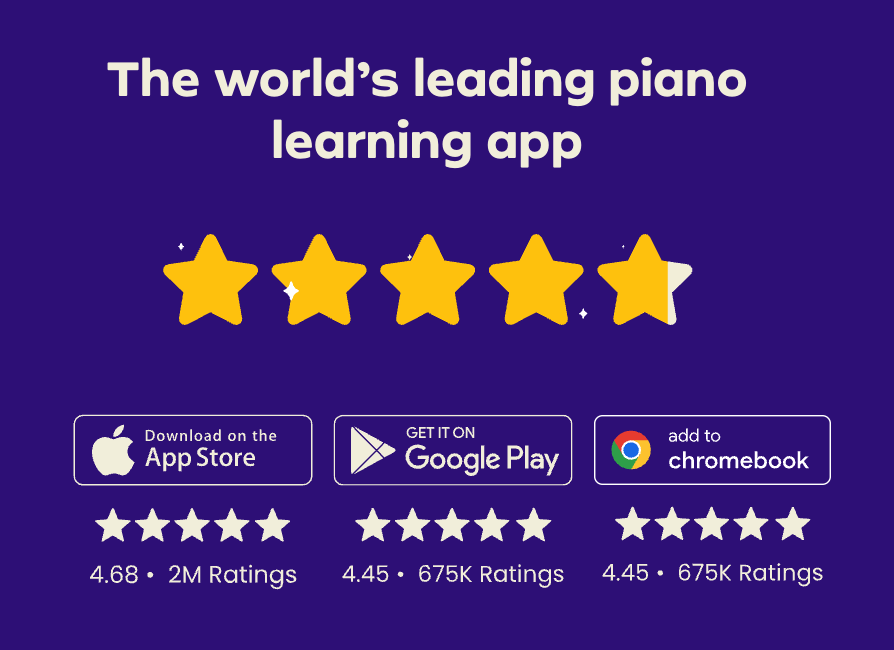
For balance, I’ve searched across the internet to see if there is general agreement on what the app is like.
And there is. Most people say that Simply Piano is a great way of getting acquainted with the piano, but less useful beyond that.
I think the comparison some people make with Duolingo is fair. Simply Piano focuses on getting you comfortable with notes, sheet music, and basic playing — but a more comprehensive approach might be required for progress beyond these skills.
Others have agreed that it’s a great platform for the basics, but limited in the musical concepts it can explain.
Although I agree there’s a lack of in-depth musical concepts, I don’t think that’s what the app is trying to be. Its focus is on getting absolute beginners familiar with the basics, building quick wins, and helping people start playing recognisable songs early.
Is Simply Piano worth it?
So, is Simply Piano worth it?
The answer depends on what you’re looking for.
Simply Piano is built for beginners and serves as an introduction to the instrument. So if you’re already a fairly skilled player, it might not be the best fit.
And if you are a total beginner who strongly prefers detailed theoretical explanations to help you learn, I might not recommend Simply Piano as a standalone solution.
However, if you’re new to the piano and you want to dive straight in and actually be able to play real songs quickly — whilst gaining a grounding in notes and key chords — Simply Piano can be a great place to start.
The app uses note-recognition technology. So you set up your phone or tablet at your piano and play what it asks you to. It’s almost like a video game: you progress only once you’ve got it right (or right enough for the system to accept it).
This way, you internalise the notes and chords, and you can go on to use them in popular songs through the app.
So if you’ve been looking for a way to play some of your favourite music quickly and you’ve never touched a piano before, Simply Piano is worth considering.
And to be honest, even if you have wider musical ambitions, the 14-day free trial means you have very little to lose when it comes to testing whether or not Simply Piano is right for you — just confirm the current trial details at checkout.
Had to drop a comment regarding the 7-day free trial. Be sure to check which subscription periods offer the free trial. For my country it was only the year long subscription which I initially didn’t notice. However their customer service was very helpful and friendly and I got my 3 month subscription refunded after I noticed during the first week of use that Simply Piano wasn’t what I was looking for =)
Can I unlock all simply piano corses in free ?
Hi Sawandi, Simply Piano has a seven day free trial, during that time you can access all their resources. If you’re not happy you won’t be charged as long as you cancel within the trial period
How can I gift a Simply Piano subscription to a family member?
Hi Liz,
Where did you see that the app has been downloaded more than 100,million times? It seems to have jumped a lot in 3 years since it was around 5 million then?
Just interested as doing some research on piano apps for a study piece.
Many thanks.
Hi David, Just noticed that it was Charlie (who’s our musician) who reviewed this platform. But I did a quick search on ‘Simply Piano 100 million downloads’ and the Hello Simply website (which featured at the top) had it in the meta description (though I could not find it when I clicked through to the website). Hope that helps with your research
Liz
Great review on Simply Piano! I’ve been considering purchasing this course for a while now, and your review has made me even more interested. The fact that you were able to learn piano in just a few weeks is definitely a selling point for me. I’m excited to see the video lessons and how they break down the techniques. Thanks for sharing your honest opinion!
I constantly spent my half an hour to read this
blog’s content all the time along with a mug of coffee.
Thank you so much! That truly means a lot. I’m glad my blog is a part of your routine—sounds like a great way to enjoy some reading! ☕😊 Let me know if there’s anything specific you’d like to see covered in the future!
With havin so much written content do you ever run into any problems of plagorism or copyright infringement? My website has a lot of exclusive content I’ve either created myself or outsourced but it seems a lot of it is popping it up all over the internet without my agreement. Do you know any solutions to help reduce content from being stolen? I’d genuinely appreciate it.
That’s a great question, and I completely understand your concern. Unfortunately, content theft is a common issue online. Some ways to help protect your content include using DMCA protection, adding copyright notices, watermarking images, and setting up Google Alerts to track unauthorized use. You can also file a DMCA takedown request if you find your content being used without permission. Hope this helps, and I appreciate you stopping by!
Hello! I could have sworn I’ve been to this blog before but after browsing through some of the post I realized it’s new to me. Anyhow, I’m definitely glad I found it and I’ll be book-marking and checking back frequently!
Hello! 😊 We’re so glad you found our blog and that you’re enjoying the content. Thank you for bookmarking and planning to visit again—we truly appreciate your support! Looking forward to having you back soon!
This web site is really a walk-through for all of the info you wanted about this and didn’t know who to ask. Glimpse here, and you’ll definitely discover it.
Hello!
Thank you for your kind words! We’re so glad you found the information helpful and that our site could be a valuable resource for you. We truly appreciate your support!
Looking forward to having you visit again soon! 🚀
Best regards,